NanoClip by Techinfotics: The Free AI Video Clipper Turning Long Videos Into Viral Shorts (2026 Review)
NanoClip by Techinfotics is a free, open-source desktop app that watches your long videos, finds the best moments with AI, writes titles, and exports vertical clips with burned-in subtitles for TikTok, Reels and Shorts — no subscription, no watermark.
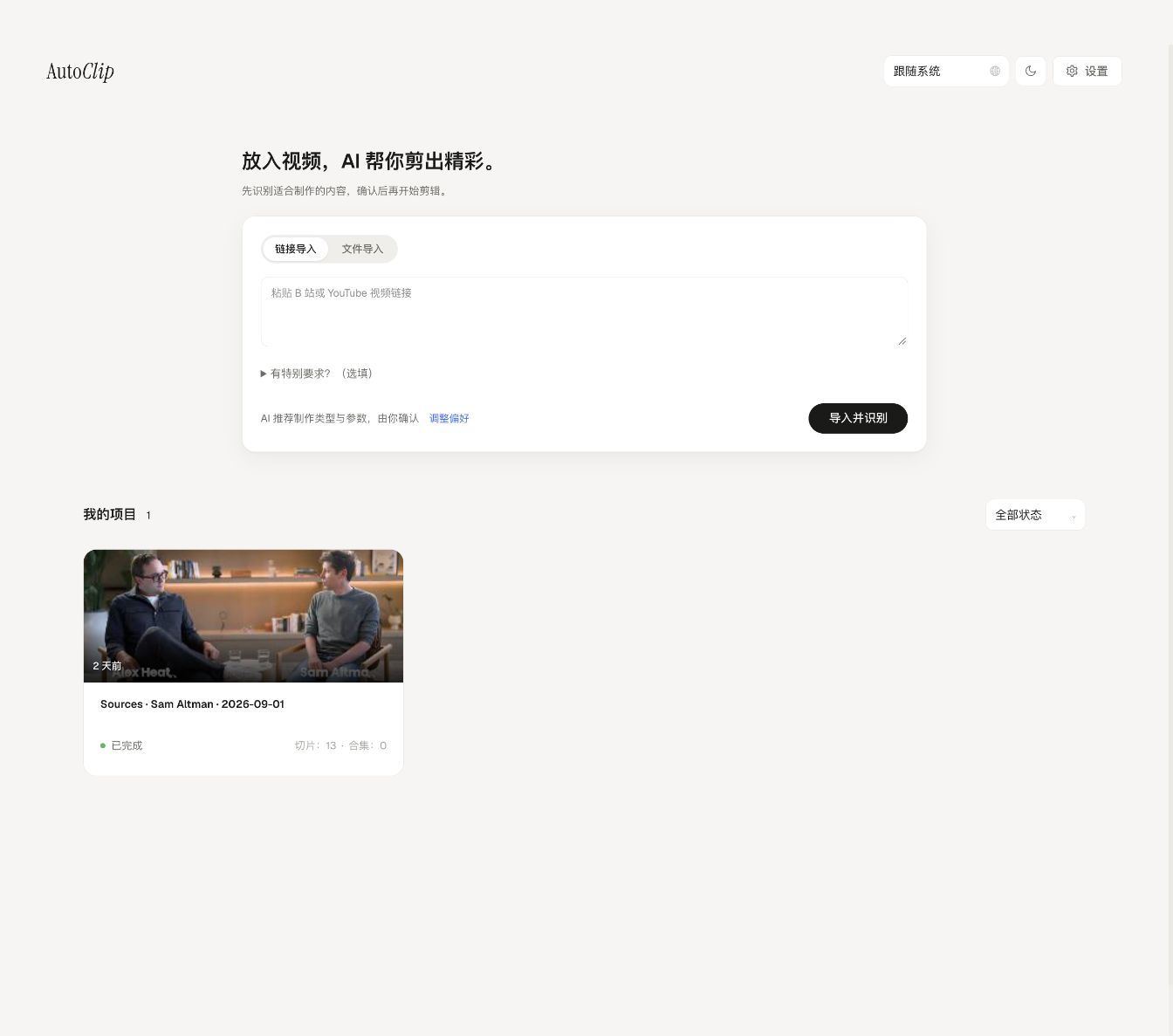
Quick answer: NanoClip by Techinfotics is a free, open-source AI video clipper that turns long videos into share-ready vertical clips. Import a video or paste a YouTube link, get automatic transcription, let AI find the highlights and write titles, then export 9:16 clips with burned-in subtitles for TikTok, Reels and Shorts. No subscription, no watermark — you just bring a free Gemini API key.
Disclosure: NanoClip is developed by our publisher, Techinfotics. We cover it here because it is a genuinely useful free tool in the AI creator stack, and we apply the same hands-on standard to it as everything else — including the limitations below.
01What NanoClip does
Got a 2-hour podcast, interview, livestream or lecture? Finding the 30-second golden moments by hand takes forever. NanoClip automates the whole pipeline:
- Import a video file — or paste a YouTube / Bilibili link.
- Transcribe speech to subtitles automatically with local Whisper, so your media stays on your machine.
- AI analyzes the transcript — it scores every moment, finds highlights, and writes catchy titles for you.
- Review & tweak the suggested clips in the Studio editor.
- Export vertical 9:16 clips with burned-in subtitles and title cards — ready to post.
It is built for podcasters, interviewers, teachers, streamers, coaches, and anyone who records long videos and wants short-form content without hours of manual editing.
02Key features
- AI highlight detection — scores every segment of your transcript and picks the moments people will actually watch.
- Smart clipping — generates clips plus suggested multi-clip compilations from a single video.
- Auto titles — AI writes a catchy title for every clip; you can edit anything.
- Export presets — one-click presets for TikTok, YouTube Shorts, Instagram Reels, Douyin, Bilibili and more.
- Burned-in subtitles — styled subtitles with custom fonts, plus an animated title card.
- Auto covers — generates cover images so platforms never reject your upload.
- Publishing calendar — publish now or schedule posts from the built-in calendar.
- 8 interface languages — English, Chinese, Japanese, Korean, Spanish, Portuguese, Russian and French.
03Your choice of AI brain
NanoClip's AI step needs a language model, and you pick the provider:
- Google Gemini (recommended) — free API key from AI Studio, about two minutes of setup.
- OpenAI-compatible APIs — point it at any compatible endpoint.
- Qwen — Alibaba's model family.
- 100% local — Ollama or LM Studio, so no transcript text ever leaves your device.
Transcription itself always runs locally via Whisper regardless of which option you choose.
04Installation options
| Your situation | What to do |
|---|---|
| Windows 10/11 (x64) | Download NanoClip_1.0.0_x64-setup.exe from GitHub Releases and run it |
| macOS (Apple Silicon) | Download the .dmg from GitHub Releases |
| Self-host / Linux | Run with Docker Compose (about 5 minutes) |
| Automation / batch jobs | Use the CLI or MCP server (Python 3.10+) |
No Python or technical setup is needed for the desktop installers. One heads-up: the Windows installer is not code-signed yet, so SmartScreen may show a "Windows protected your PC" warning — clicking More info → Run anyway is normal for new open-source apps.
05NanoClip vs paid clipping tools
Cloud clipping services charge monthly subscriptions, cap your usage, and keep your footage on their servers. NanoClip flips that model: it runs on your computer, costs nothing, watermarks nothing, and its code is MIT-licensed on GitHub for anyone to audit. The honest trade-offs: you supply the compute and the API key, setup takes a few minutes instead of zero, and as a young community project it does not have the support team of a venture-backed competitor. For creators who value free, private, and no-watermark, that trade is easy to accept.
06Verdict
NanoClip by Techinfotics is one of the most generous free tools in the AI creator stack right now: genuine highlight detection, title generation, styled subtitles and platform presets — free forever, open source, no watermark. If you publish short-form video regularly, it is worth the two-minute Gemini key setup. Download it from the official GitHub releases page.
Topics
One click helps another builder find this — thank you.
Found this useful?
Share it using the buttons above and subscribe for the next one.
Related deep-dives
 Productivity Agents
Car Loan Interest Tax Deduction 2026: Do You Qualify? (Free VIN Checker)
Since 2025, US taxpayers can deduct up to $10,000 per year of car loan interest — but only if the car passes 4 strict rules. Here's the plain-English breakdown, the income limits nobody mentions, and a free VIN checker to verify your vehicle in seconds.
 Productivity Agents
VoiceStudio Is the Free ElevenLabs Alternative That Keeps Your Voice Local
VoiceStudio is a free, open-source voice platform that runs core speech workflows on your computer, including voice cloning, multilingual TTS, dubbing, transcription, audiobooks, an OpenAI-compatible API and an MCP server.
 Productivity Agents
AI Side Hustles 2026: 9 Realistic Ways to Earn With ChatGPT, Claude & Gemini
Forget the 'make $10K with ChatGPT' TikTok hype. We dug through publicly shared income reports, founder interviews, and case studies from solo operators crossing $5K/month with AI in 2026 — and reverse-engineered what they sell, which tools they use (Claude, ChatGPT, Gemini, Lovable, n8n), how they price, and how long it took. These are the 9 AI side hustles still working in 2026 — with the prompts, stacks, and pitfalls.